


Introduction
The Central Processing Unit (CPU), often referred to as the brain of the computer, is a vital component that determines the overall performance of your machine. From executing tasks to controlling other hardware, the CPU plays an integral role in the functioning of modern computers. But what exactly is a CPU, how does it work, and why is it so essential?
In this article, we’ll break down the function of the CPU, explore how it processes data, and explain why it’s critical to your computer’s operation. Understanding the CPU can help you make informed decisions when buying a computer, optimizing performance, or upgrading your system.
Table of Contents
What is the CPU?
The CPU (Central Processing Unit) is the primary component responsible for interpreting and executing instructions within a computer. It processes all types of data and manages the operations of the rest of the system. Essentially, it’s the unit that drives every action the computer performs, whether it’s running an application, playing a video game, or browsing the web.
The CPU is often compared to the human brain because, like the brain, it processes all instructions and commands that control the body (or computer). Without it, your computer would be unable to perform even the most basic tasks.
How Does the CPU Work?
The CPU works by following a simple cycle, known as the fetch-decode-execute cycle. Let’s explore each step in more detail:
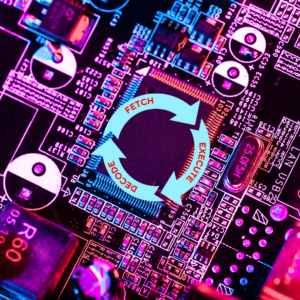
1. Fetch
The CPU retrieves instructions from the system’s Random Access Memory (RAM). These instructions are stored as binary code (a series of 0s and 1s). The CPU identifies the location of the next instruction using the program counter, which keeps track of where the CPU is in the sequence of instructions.
2. Decode
Once the CPU fetches the instruction, it decodes it to understand what needs to be done. This involves breaking down the binary code into a more understandable form that tells the CPU which operation to perform.
3. Execute
After decoding, the CPU executes the instruction. This could involve performing arithmetic calculations, moving data between memory locations, or interacting with other hardware components like the GPU (Graphics Processing Unit).
Why Is the CPU Called the Brain of the Computer?
The CPU is often referred to as the “brain” of the computer because, like the human brain, it processes information, makes decisions, and directs other components to work together. The CPU manages and controls everything within the system. Just as the brain controls bodily functions, the CPU orchestrates the various parts of the computer to work harmoniously, enabling tasks to be carried out efficiently.
- Decision-Making Power: The CPU continuously makes decisions on which tasks to prioritize and how resources should be allocated.
- Processing Speed: Just as the brain processes information at incredible speeds, the CPU can execute billions of instructions per second, allowing for fast and responsive computing.
Key CPU Components
To better understand how the Central Processing Unit functions, let’s break down the essential components of a CPU:
1. Arithmetic Logic Unit (ALU)
The ALU handles all mathematical calculations and logical operations. It’s the part of the CPU that does the heavy lifting when it comes to performing arithmetic, such as addition, subtraction, and comparison operations.
2. Control Unit (CU)
The Control Unit directs the operation of the processor. It tells the CPU how to respond to the instructions it receives by coordinating with other hardware components.
3. Cache Memory
Cache memory is a small amount of high-speed memory located within the CPU. It stores frequently used instructions and data to speed up processing times. The closer this memory is to the CPU, the faster the CPU can access it, reducing the time spent fetching data from the RAM.
Different Types of CPUs
When choosing a computer, you may come across different types of CPUs, such as:
- Intel Core Processors: One of the most common types of CPUs found in laptops and desktops. Intel Core processors come in a range of models, from Core i3 (entry-level) to Core i9 (high-performance).
- AMD Ryzen: AMD’s Ryzen processors have gained popularity for their excellent multi-core performance, making them great for gaming, video editing, and multitasking.
- Apple M1/M2: Apple’s new ARM-based chips, M1 and M2, have revolutionized the performance of Macs, offering significant improvements in speed and efficiency.
Each type of CPU is designed for specific needs, whether you’re a casual user, a gamer, or a professional working on intensive tasks.
CPU Performance Metrics
To determine how well a CPU performs, there are several key metrics to consider:
1. Clock Speed
Measured in gigahertz (GHz), the clock speed determines how many instructions the CPU can execute per second. The higher the clock speed, the faster the CPU can process information.
2. Cores
Modern CPUs come with multiple cores, allowing them to execute multiple instructions simultaneously. A CPU with more cores can handle more tasks at once, which is beneficial for multitasking and demanding applications.
3. Threads
Each core in a CPU can handle two threads, allowing for parallel processing. CPUs with higher thread counts, like those in AMD Ryzen processors, are ideal for video editing, rendering, and gaming.
Inside a CPU
Here’s an illustration showing the components of a CPU, including the ALU, Control Unit, and Cache Memory:

This image breaks down the inner workings of a CPU, showcasing how different components work together to perform calculations and manage data flow.
CPU’s Role in Different Applications
1. Gaming
A powerful CPU is essential for gaming, particularly in titles that require a lot of processing power for AI, physics, and background tasks. Games that rely on fast response times, such as first-person shooters, benefit greatly from CPUs with high clock speeds and multiple cores.
2. Video Editing
For video editors, the CPU plays a critical role in rendering videos, editing high-resolution footage, and working with multiple layers of effects. Multi-core processors, like the AMD Ryzen 9, are excellent choices for this task.
3. Everyday Computing
For general users who primarily browse the web, stream videos, or work on documents, a dual-core processor with a moderate clock speed is typically sufficient. Entry-level CPUs, such as Intel Core i3 or AMD Ryzen 3, offer great performance for casual computing needs.
How to Choose the Right CPU for Your Needs
Selecting the right CPU depends on how you plan to use your computer. Here’s a quick guide:
- For Gaming: Look for CPUs with high clock speeds (e.g., Intel Core i5/i7 or AMD Ryzen 5/7) for smooth gameplay and minimal lag.
- For Video Editing or Graphic Design: Opt for multi-core processors (e.g., AMD Ryzen 9 or Intel Core i9) to handle rendering and multitasking efficiently.
- For Everyday Use: A budget-friendly CPU with fewer cores (e.g., Intel Core i3 or AMD Ryzen 3) is perfect for casual users who don’t need intensive performance.
Conclusion
The Central Processing Unit (CPU) truly is the heart of your computer, responsible for carrying out every task your machine performs. Whether you’re gaming, editing videos, or simply browsing the web, the CPU plays a pivotal role in ensuring your computer runs smoothly.
Understanding how the CPU works, what its key components are, and how to choose the right one can significantly enhance your computing experience. Whether you’re looking to upgrade your system or purchase a new computer, paying attention to the CPU is crucial for optimizing performance.
FAQs
- What does the CPU do in a computer?
- The CPU processes instructions and manages the operations of other components, essentially acting as the brain of the computer.
- Why is the CPU important for gaming?
- The CPU handles tasks like AI and physics in games, and a faster CPU ensures smoother gameplay with fewer slowdowns.
- How many cores do I need in a CPU?
- For general use, a dual-core processor is sufficient. For gaming or professional tasks, opt for at least four cores or more.
- Can I upgrade my CPU?
- Yes, many desktop CPUs can be upgraded, but ensure your motherboard is compatible with the new processor.
- What is the difference between Intel and AMD CPUs?
- Intel processors typically offer better single-core performance, while AMD Ryzen CPUs excel in multi-core tasks, making them better for multitasking and content creation.
For more content like this, contact us. Or visit our Facebook page.

I think the admin of this website is in fact working hard in support of his website, as here every stuff is quality based stuff.
Hi there, I found your website via Google whilst looking for a related topic, your site came up, it appears to be like great. I’ve bookmarked it in my google bookmarks.
Hello, i read your blog occasionally and i own a similar one and i was just curious if you get a lot of spam feedback? If so how do you stop it, any plugin or anything you can recommend? I get so much lately it’s driving me insane so any help is very much appreciated.
Its like you read my mind! You appear to know so much about this, like you wrote the book in it or something.
Great blog post. What I would like to make contributions about is that personal computer memory is required to be purchased when your computer still cannot cope with what you do with it. One can put in two RAM memory boards containing 1GB each, for example, but not one of 1GB and one with 2GB. One should make sure the maker’s documentation for the PC to make certain what type of memory is needed.
Hi, i think that i saw you visited my weblog so i came to “return the favor”.I am trying to find things to enhance my site!I suppose its ok to use some of your ideas!!
Hello, i read your blog occasionally and i own a similar one and i was just curious if you get a lot of spam feedback? If so how do you stop it, any plugin or anything you can recommend? I get so much lately it’s driving me insane so any help is very much appreciated.
Hi I am so happy I found your weblog, I really found you by error, while I was searching on Aol for something else, Anyways I am here now and would just like to say many thanks for a fantastic post and a all round interesting blog (I also love the theme/design), I don’t have time to read it all at the moment but I have saved it and also included your RSS feeds, so when I have time I will be back to read more, Please do keep up the fantastic work.
You really make it appear really easy together with your presentation however I find this topic to be really something which I believe I might by no means understand. It seems too complicated and extremely extensive for me. I am taking a look ahead on your next put up, I will attempt to get the hold of it!
Wow, marvelous weblog structure! How long have you ever been running a blog for? you make running a blog glance easy. The overall look of your web site is wonderful, as smartly as the content material!
I just like the valuable information you provide on your articles.I’ll bookmark your blog and test again here frequently.I’m quite certain I’ll be informed plenty of new stuff proper right here! Good luck for the next!
Now I am ready to do my breakfast, once having my breakfast coming over again to read more news
Thank you for the auspicious writeup. It in fact was a amusement account it. Look advanced to far added agreeable from you! By the way, how could we communicate?
Hello to all, the contents existing at this web page are genuinely remarkable for people knowledge, well, keep up the good work fellows.
Your mode of explaining everything in this piece of writing is genuinely pleasant, every one be capable of simply be aware of it, Thanks a lot.
I was drawn into your words immediately, not just by the ideas, but by the warmth they radiate.
I’m really enjoying the design and layout of your website.It’s a very easy on the eyes which makes it much more pleasant for me to come here and visit more often. Did you hire out a developer to create your theme?
I’ve been surfing online more than 3 hours today, yet I never found any interesting article like yours. It’s pretty worth enough for me. Personally, if all webmasters and bloggers made good content as you did, the web will be much more useful than ever before. http://www.kayswell.com
Really when someone doesn’t be aware of afterward its up to other viewers that they will help, so here it occurs.
Hello everyone, it’s my first pay a visit at this website, and paragraph is in fact fruitful in support of me, keep up posting these types of articles. http://www.kayswell.com
Nice answers in return of this matter with firm arguments and telling everything concerning that. http://www.kayswell.com
If some one desires expert view concerning blogging afterward i advise him/her to pay a visit this weblog, Keep up the good work. http://www.kayswell.com
It’s genuinely very difficult in this busy life to listen news on Television, so I just use world wide web for that reason, and take the most up-to-date news.
My partner and I stumbled over here coming from a different page and thought I might check things out. I like what I see so i am just following you. Look forward to finding out about your web page yet again. http://www.kayswell.com
I am sure this article has touched all the internet people, its really really nice post on building up new blog.
What’s up, after reading this awesome post i am too happy to share my familiarity here with colleagues. http://www.kayswell.com
Hi, i think that i saw you visited my weblog so i came to “return the favor”.I am trying to find things to enhance my site!I suppose its ok to use some of your ideas!! http://www.kayswell.com
I constantly emailed this blog post page to all my contacts, for the reason that if like to read it after that my friends will too.
I must thank you for the efforts you’ve put in penning this blog.
I am hoping to see the same high-grade content by you later on as well.
In fact, your creative writing abilities has inspired me to get my own site now 😉
of course like your web-site but you need to test the spelling on several of your
posts. A number of them are rife with spelling issues and I find it very bothersome to tell
the reality then again I’ll surely come again again.
Very nice post. I just stumbled upon your weblog and wished to say that I’ve really enjoyed browsing your blog posts. After all I’ll be subscribing to your feed and I hope you write again soon!
Aw, this was a very nice post. Taking the time and actual effort to create a great article… but what can I say… I hesitate a whole lot and never seem to get nearly anything done.
Hello there! I could have sworn I’ve been to this blog before but after checking through some of the post I realized it’s new to me.Anyways, I’m definitely glad I found it and I’ll be bookmarking and checking back frequently! http://www.kayswell.com
This is my first time visit at here and i am actually happy to read everthing at alone place.
Great blog you’ve got here.. It’s difficult to find excellent writing like yours these days. I seriously appreciate individuals like you! Take care!!
Hi, Neat post. There is a problem with your site in web explorer, might test this? IE still is the market chief and a large component of other people will leave out your wonderful writing because of this problem.
I will immediately grab your rss as I can not find your email subscription link or newsletter service. Do you have any? Please let me know so that I could subscribe. Thanks.
canadian online bingo games, usa roulette rules and real money gambling online united states, or gambling united states statistics
Here is my web site goplayslots.net
What i do not understood is actually how you’re no longer really much more well-preferred than you may be now. You’re very intelligent. You know thus significantly in terms of this subject, made me personally believe it from a lot of numerous angles. http://www.ifashionstyles.com Its like men and women aren’t interested unless it’s something to do with Girl gaga! Your individual stuffs great. At all times deal with it up!
Nice post. I learn something new and challenging on sites I stumbleupon everyday. It’s always exciting to read through content from other authors and practice a little something from other web sites.
This is my first time pay a visit at here and i am really pleassant to read all at single place.
I feel this is one of the such a lot important information for me. And i’m satisfied reading your article. But should observation on some normal issues, The site style is perfect, the articles is actually nice :
I constantly emailed this blog post page to all my contacts, for the reason that if like to read it after that my friends will too. http://www.ifashionstyles.com
I am not sure where you are getting your info, but good topic. I needs to spend some time learning more or understanding more. Thanks for excellent info I was looking for this information for my mission.
I’m not sure where you’re getting your info, but great topic. I needs to spend some time learning more or understanding more. Thanks for great info I was looking for this information for my mission. http://www.ifashionstyles.com
It’s genuinely very difficult in this busy life to listen news on Television, so I just use world wide web for that reason, and take the most up-to-date news.
One thing I have actually noticed is there are plenty of misguided beliefs regarding the banking institutions intentions when talking about property foreclosure. One myth in particular is the fact that the bank wishes to have your house. The bank wants your cash, not your property. They want the cash they lent you together with interest. Staying away from the bank will only draw a foreclosed summary. Thanks for your publication.
I am genuinely thankful to the owner of this web page who has shared this fantastic post at here.
Pizza Lieferservice in der Nahe ist klasse! Schnelle Lieferung, frische Pizza.
Pizzabestellung
to this require a great deal of work? I have very little knowledge of computer programming however I had been hoping to start my own blog in the near future. Anyway, should you have any suggestions or tips for new blog owners please share. I understand this is off topic but I simply needed to ask.